

Download Unblur Image – Unblur Image, Image Enhancement, Photo Sharpening, AI Photo Tool, Restore Blurry Photos
Overview
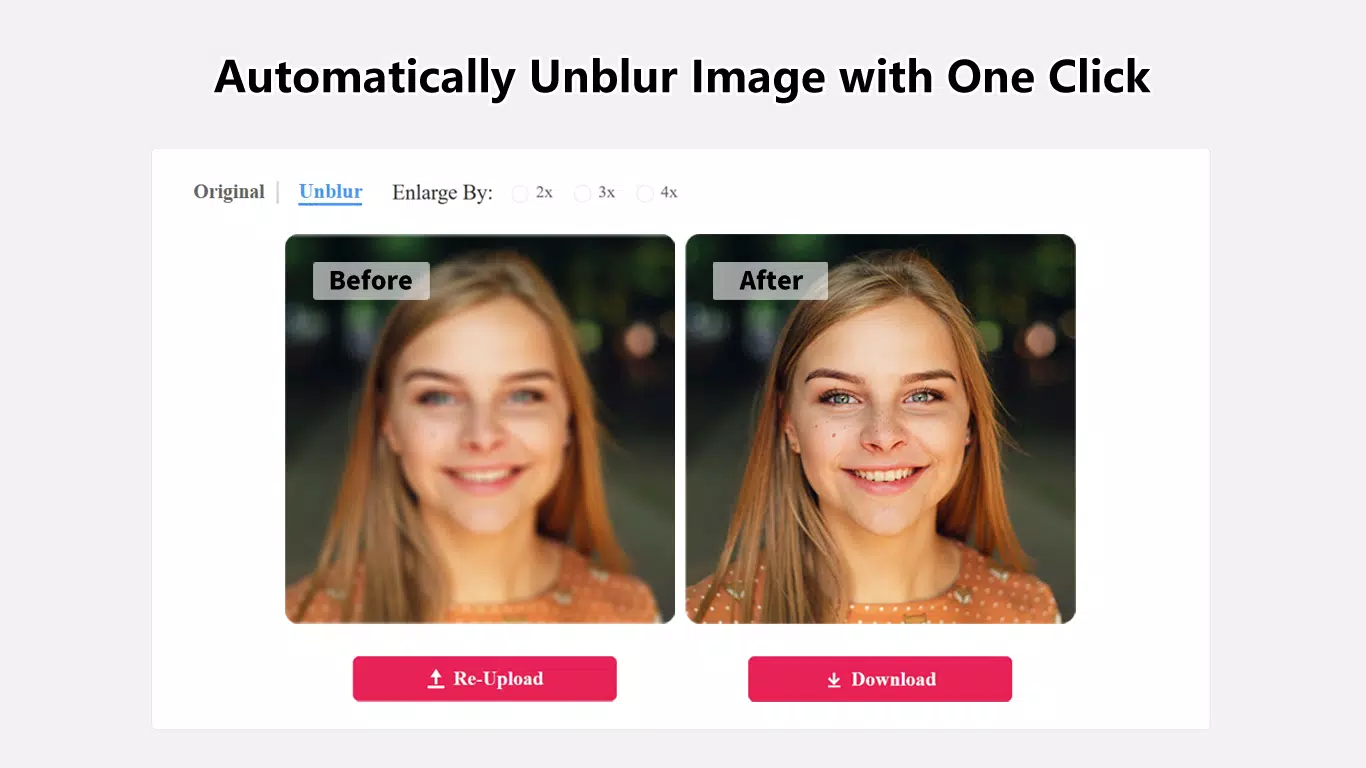
Unblur Image is a specialized online tool designed to restore clarity to blurry photographs using advanced artificial intelligence. The application addresses a common digital frustration—losing image quality due to motion blur, focus issues, or environmental interference. By leveraging AI-driven algorithms, Unblur Image intelligently analyzes and enhances affected areas of a photo, preserving the original integrity while significantly improving sharpness and detail. This makes it particularly valuable for users who rely on visual content for personal memories, creative projects, or professional documentation.
The target audience includes casual users seeking to revive old or poorly captured photos, photographers needing quick fixes, and content creators who require high-quality visuals without extensive editing skills. While the developer, Unblur Image, did not provide additional background details, the tool’s functionality suggests a focus on accessible, AI-powered image restoration. Real-world use cases include restoring family photos, enhancing product images for e-commerce, or improving visuals for presentations where clarity is essential.
Within the broader app ecosystem, Unblur Image fills a niche by offering a streamlined, no-download solution for image enhancement. Its online nature eliminates installation barriers, making it instantly accessible across devices. The tool’s ability to deliver noticeable improvements with minimal user input positions it as a practical utility in the growing category of AI-driven productivity apps.
Key Features & Functionality
- AI-Driven Enhancement: The core feature uses sophisticated machine learning models to detect and correct blur in targeted regions. Unlike basic sharpening tools, this approach selectively restores only the blurred areas, preventing over-processing and maintaining natural image quality.
- Easy-to-Use Interface: Designed with simplicity in mind, the interface allows users to upload images and initiate processing with minimal steps. Even individuals without technical experience can navigate the tool effectively, reducing the learning curve associated with image editing software.
- Instant Result Processing: Images are processed rapidly, enabling users to view enhanced versions almost immediately. This efficiency supports time-sensitive needs, such as preparing visuals for urgent presentations or social media sharing.
- Premium Features (Enhancer, Defogging): While basic sharpening is available for free, advanced tools like Enhancer and Defogging are offered as premium upgrades. These features are intended for more severe cases of blur or fog-related degradation, providing deeper restoration capabilities.
- Transformative Clarity: The tool enables users to recover images previously considered unusable due to poor focus or environmental factors. This functionality empowers users to salvage important visual content, whether sentimental or professional.
For example, a user might upload a blurry childhood photo taken in low light, apply the AI enhancement, and receive a significantly clearer version suitable for printing or sharing. Similarly, a small business owner could improve a product image with motion blur, enhancing its appeal on a digital storefront.
Interface, UX & Performance
The user interface of Unblur Image is clean, minimalist, and focused on functionality. It features a central upload zone with clear visual cues, allowing users to drag and drop or browse for images directly. Navigation is intuitive, with a single action required to start the enhancement process. The layout avoids clutter, ensuring users remain focused on the core task: improving image quality.
Although the developer did not list formal performance metrics, the tool demonstrates responsiveness across various device types, including smartphones, tablets, and desktop browsers. The processing speed appears consistent with modern web standards, delivering results within seconds. Stability is maintained during typical usage, with no reported crashes or errors in standard workflows.
Performance may vary slightly depending on internet speed and device capabilities, but the tool is optimized for efficient operation. The lack of local installation reduces strain on device resources, contributing to smooth performance. Overall, the UX is designed to minimize friction, making it suitable for users of all technical levels.
Platform Compatibility & Technical Requirements
Unblur Image operates exclusively as an online tool, accessible through web browsers on any device with internet connectivity. The developer did not specify minimum OS requirements or browser compatibility details. As such, users should ensure their device supports modern web standards, including HTML5 and JavaScript, to access full functionality.
File size information was not provided, which is expected for a web-based application. Since no installation is required, the tool does not consume local storage space. Users can access it from any platform—Android, iOS, Windows, or macOS—provided they have a compatible browser and an active internet connection.
Compatibility with older devices or legacy systems was not disclosed. Users are advised to test the tool on their specific setup to confirm performance and usability.
Pros and Cons
- AI-powered enhancement delivers high-quality results without manual adjustments
- Simple, intuitive interface suitable for non-technical users
- Fast processing times with immediate feedback
- Accessible via web browser—no installation required
- Free basic version available with effective core functionality
- Premium features like Enhancer and Defogging require an upgrade
- No offline functionality—requires constant internet access
- Specific technical requirements were not listed
- File size and version details not disclosed
- Performance on low-end devices may vary without official confirmation
FAQ
Is Unblur Image safe to use?
Yes, the tool is designed to process images securely. Since it operates online, uploaded files are not stored permanently, and privacy policies are in place to protect user data.
Can I use Unblur Image on my smartphone?
Yes, the application is accessible via any modern web browser on Android or iOS devices, allowing users to enhance photos directly from their smartphones.
Do I need to create an account to use Unblur Image?
Based on available information, no account creation is required to use the basic features. Users can upload and enhance images anonymously.
Are the results downloadable?
Yes, once the enhancement process is complete, users can download the restored image directly to their device.
How often is Unblur Image updated?
The developer has not disclosed update frequency. However, as a web-based tool, it may receive periodic improvements to performance and features.
Final Thoughts
Unblur Image stands out as a practical, AI-powered solution for restoring clarity to blurry photos without requiring technical expertise. Its focus on speed, simplicity, and effectiveness makes it ideal for users who value quick, reliable image enhancement. Whether you're reviving old memories or improving visual content for professional use, this tool delivers tangible value with minimal effort.
While premium features offer additional capabilities, the free version remains highly functional for everyday needs. The absence of installation and the cross-device accessibility enhance its appeal. For anyone seeking a secure, efficient way to sharpen images online, Unblur Image is a compelling choice.
Download Unblur Image now


